
Docs / Using FramePort
Controller buttons
Experimental. The Frame's runtime accepts these bindings, but few games have been tried in the headset. If buttons stop working in a game, set the game back to SteamVR default (Game settings → Controllers) and report the problem.
Quest games expect Quest Touch controllers. The Frame's left controller has a d-pad and a View button; the right one has an A/B/X/Y diamond and a Menu button. Without a game's own Frame bindings, SteamVR sends Touch X/A from the bottom button and Touch Y/B from all three top buttons, so the right X and Y both send Touch B. View sends Touch Menu.
Controller buttons offers other mappings for Quest games:
- SteamVR default (0): SteamVR's mapping above. The initial default.
- Mirror (1): uses every face button. Bottom and outer send X/A; top and inner send Y/B, as on a Quest controller, whose second button sits up and toward the other hand.
- Quest pair (2): two buttons per controller, placed like Touch's: left X = d-pad down, Y = d-pad right; right A = A, B = X. The other face buttons send nothing.
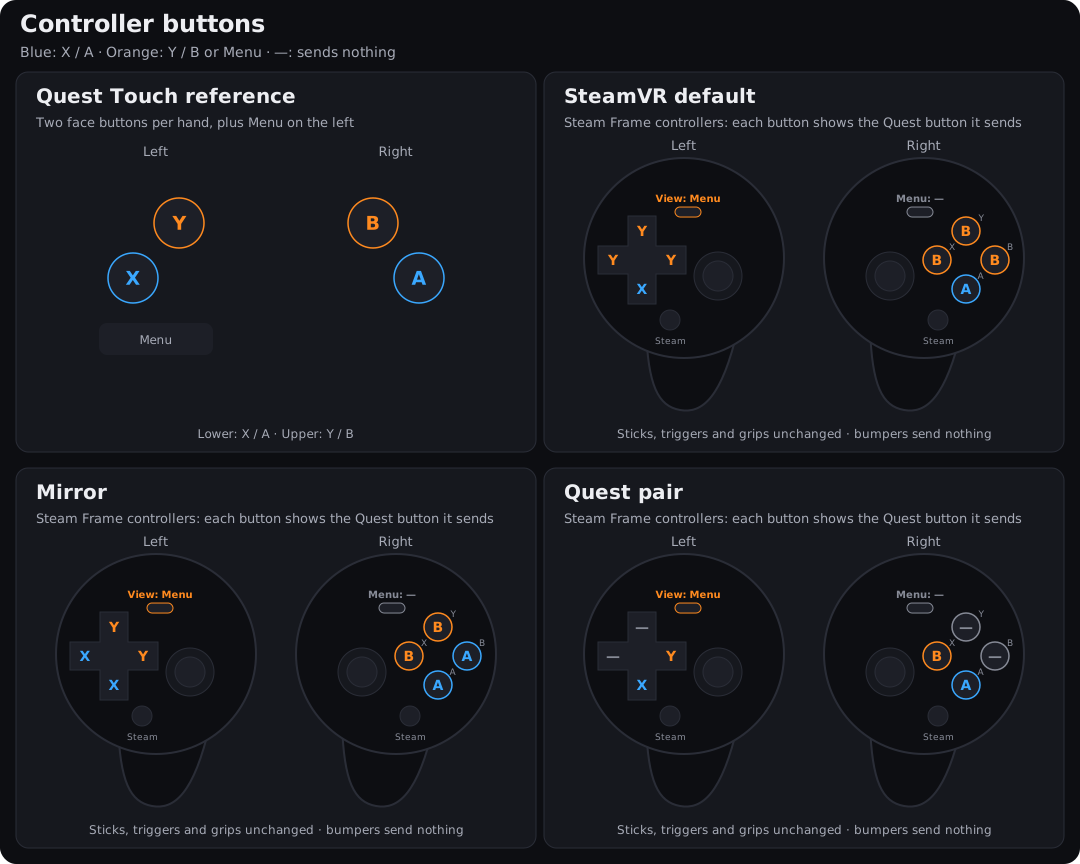
The small label names the physical button, the large one the Touch input the game gets. Blue is X/A, orange is Y/B or Menu, a dash is no input.
| Frame input | SteamVR default (0) | Mirror (1) | Quest pair (2) |
|---|---|---|---|
| Left d-pad ↑ | Y | Y | — |
| Left d-pad ↓ | X | X | X |
| Left d-pad ← | Y | X | — |
| Left d-pad → | Y | Y | Y |
| Left View | Menu | Menu | Menu |
| Right A (bottom) | A | A | A |
| Right B (right) | B | A | — |
| Right X (left) | B | B | B |
| Right Y (top) | B | B | — |
| Right Menu | — | — | — |
| Left bumper | — | — | — |
| Right bumper | — | — | — |
Triggers, grips, thumbsticks, tracking and vibration keep their Touch bindings. View sends Menu click only.
#Choose a mode
- One game: Game settings → Controllers → Controller buttons. Use global default follows Settings; any other choice stays for that game, including an explicit SteamVR default.
- All games: Settings → Controllers. New installs and updates use the default for games without their own choice. Apply to installed games now sends the default to installed Quest games that follow it.
Changes apply at the next launch. Games installed before this feature need Update on Frame once.
Command line, for an installed game (writes the Frame's settings only):
frameport settings <pkg> quest_buttons=2
To keep the value through later installs, also save the value in the recipe (or use Game settings):
frameport recipe <pkg> --set quest_buttons=2
#Limits
- Custom bindings in SteamVR's binding UI override these. Check them if the result differs from the diagram.
- The d-pad has one touch sensor: a thumb resting on the d-pad touches X and Y together. The right face buttons sense touch one by one.
- Bumpers and thumbrest touch have no Touch counterpart and do nothing. System buttons keep their role.
- Mirror and Quest pair need the runtime's
XR_VALVE_frame_controller_interactionextension. Without the extension, FrameBridge logs the fact and keeps SteamVR's mapping. - Games with their own Frame Controller bindings keep them; these modes don't replace a game's own mapping.
- Touch bindings on bare pose, trigger, squeeze or button paths are translated too, as are
/pose,/value,/clickand/touchwhere the mapping has them. - Finger proximity emulation (
proximity_emul) keeps working with Mirror and Quest pair. - Applies to Quest VR games, including 32-bit games on the bridge. PC VR games and flat Android apps aren't changed.
The mapping follows Valve's Frame Controller input reference
and the shared mapping data. uv run python scripts/controller_diagram.py regenerates
the diagram, app illustrations and table (--check verifies them).